


Floor Plan to 3D Model AI: 4 Ways, File Types and Limits
The four ways to turn a 2D floor plan into a 3D model compared fairly, a checklist that makes any plan readable for AI, what .obj and .glb files are and what opens them in 2026, and what plan-to-3D tools will never do.

Written by Velocity Team
Architecture and design team at Velocity AOI
Published
Updated
Reading time
11 min
On this page11 sections · 11 min read
- What does floor plan to 3D model AI actually do?
- What are the four ways to turn a floor plan into a 3D model?
- Which way should you pick?
- What makes a floor plan readable for AI?
- How does Velocity's Plan to 3D work?
- What are .obj and .glb files, and what opens them?
- What can you do with the model next?
- What won't a plan-to-3D AI do?
- Is there a free floor plan to 3D converter online?
- FAQ
- Turn your plan into something you can walk around
Floor plan to 3D model AI reads a 2D plan (a PDF, CAD export or clear photo), finds the walls, doors, windows and rooms, and builds a 3D model you can rotate, furnish and export. The good ones measure from the plan; the weak ones guess. Your plan's quality decides which result you get, so prepare it first and check the dimensions after.
Below is a fair look at the four ways to get a model from a plan, a checklist for making a plan readable, what .obj and .glb files are and what opens them in 2026, and what no plan-to-3D tool will do for you.
Key takeaways
- There are four routes: model it yourself, redraw it in a room-planner app, use an image-to-3D AI, or use a plan-reading AI. Only the first and last start from your actual measurements.
- A readable plan has dimensions or a scale, one floor per image, a clean export and clear door and window symbols.
- Ask for .glb if you want one tidy file; .obj if your next software prefers it.
- Windows' own 3D Viewer left the Microsoft Store on 1 July 2026, so plan to open models in Blender, SketchUp or a browser viewer.
- A plan-to-3D model is for seeing and designing. It is not a structural or services drawing.
What does floor plan to 3D model AI actually do?
It turns a flat plan into a measured 3D building: walls get height and thickness, doors and windows become openings, rooms become spaces you can look into. You get a model, not just a picture, so you can view it from any angle, furnish it or carry it into other software.
That is the difference from a 3D elevation, which is one realistic picture of one face of the house. If what you need is the front of the house as seen from the road, read our sister guide on 2D plan to 3D elevation with AI. If you want the whole measured building, carry on.
What are the four ways to turn a floor plan into a 3D model?
You can build the model by hand, redraw the plan inside a room-planner app, give the image to a general image-to-3D AI, or use an AI that reads plans and measures them. They differ most in accuracy and in whether you can edit what comes out.
| Route | What you give it | Accuracy | Can you edit it? | What you get | Speed | Skill needed |
|---|---|---|---|---|---|---|
| 1. Model by hand (SketchUp, Blender, Revit) | Dimensions or a CAD file | As good as you are | Fully | Native file, export to most formats | Slowest | High |
| 2. Room-planner app (you redraw walls in it) | Your redraw of the plan | As good as your redraw | Inside the app; exports vary by app | In-app 3D views | Medium | Low to medium |
| 3. Image-to-3D AI (general) | Any picture | Guessed; scale not guaranteed | Usually a single mesh, not separate walls | A mesh, or sometimes only a rendered image | Fast | Low |
| 4. Plan-reading AI (measures) | A clean plan with dimensions | Follows the plan; you still verify | Depends on the tool and export | A measured model (.obj, .glb or similar) | Fast | Low |
Two warnings sit behind that table. First, many "floor plan to 3D" tools online produce a rendered image of a 3D-looking plan, not a model. Nothing to download and turn around. Check that the output is a file before you spend time on it. Second, a general image-to-3D AI is built for objects, so it may give you a pretty lump with the right mood and the wrong room sizes.
Which way should you pick?
Pick by what you will do with the model next. A quick guide:
- You want to see the flat before you buy, or show family the layout. A plan-reading AI is enough.
- You are an interior designer starting a project. Plan-reading AI for the shell, then your usual software for joinery and furniture.
- You are an architecture student. Model it by hand at least once; you learn more from that than from any tool. Use AI for later iterations.
- The plan is a hand sketch with no dimensions. No tool can measure what is not there. Redraw it with dimensions first.
What makes a floor plan readable for AI?
A plan reads well when walls, openings and scale are unambiguous. Before you upload, run through this checklist:
- Scale is known. Dimensions are printed, or there is a scale bar, or you know at least one length (say the living room is 3.6 m wide).
- One floor per image. A sheet with ground, first and terrace plans side by side should be split, or the tool should let you pick one.
- Clean export beats a photo. Export the PDF or CAD drawing as a large image. If you must photograph a print, shoot it flat, straight on, in even light with no shadow across it.
- Big enough. Small screenshots blur thin walls into nothing. Export larger than you think you need.
- Walls stand out. Walls should be visibly thicker or darker than furniture and tile lines. Turn off furniture and hatch layers in CAD if you can.
- Door swings and windows are legible. Arcs for doors and the triple line for windows are how a tool tells an opening from a wall.
- Clutter is cropped. Remove the title block, logos, watermarks and the stamp that sits across a builder's brochure plan.
- You know what the numbers mean. A builder's brochure plan may show internal room sizes and leave out columns, beams and shafts. Know this before you trust the result.
Do you need a floor plan to 3D model prompt? For a plan-reading tool, mostly not: the plan is the instruction. Where a tool asks for text, describe finishes and furniture ("light oak floor, white walls, L-shaped modular kitchen"), never the layout, or you invite it to move walls. The same applies whether you call it a floor plan, a house plan or a building plan.
How does Velocity's Plan to 3D work?
We built Plan to 3D, part of the AI Suite on Velocity AOI, to measure from your plan rather than guess. Here is the flow:
- Upload your 2D floor plan as a PNG, JPG or PDF.
- Choose the floor. It finds the floors on the sheet; pick one, or use the whole sheet. If the picture is small, it suggests a larger export, because a larger export measures better.
- Let it read the plan room by room. Walls, openings and rooms are picked up one space at a time.
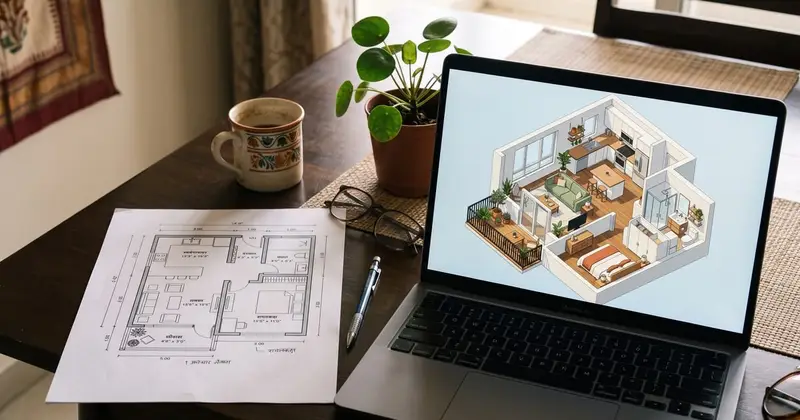
- Get the measured 3D model, drawn as an isometric view, with an optional photoreal finish if you want a presentation image.
- Download it as .obj or .glb.
- Build it again with another finish, furniture or size. The plan stays as it is, so you are comparing like with like.
- Find it later. Results are saved in your account.
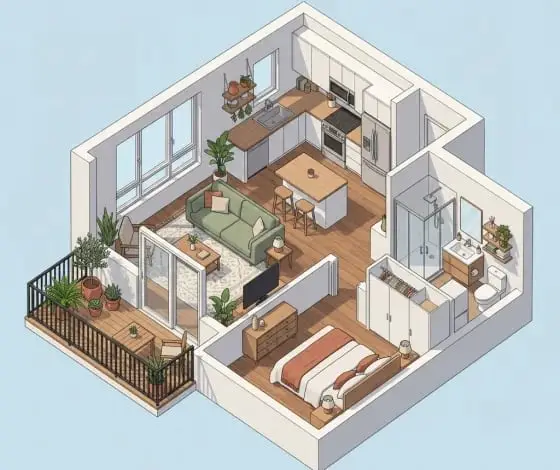
Where it is the wrong tool: a hand sketch without dimensions, a site survey you need to millimetre accuracy, or a building with complex curved or sloping geometry. Model those by hand.
What are .obj and .glb files, and what opens them?
Both are common 3D exchange formats. OBJ is the older, very widely supported one for geometry, with materials in a separate .mtl file. GLB is the single-file binary form of glTF, which the Khronos Group describes as a "royalty-free specification for the efficient transmission and loading of 3D scenes and models"; its glTF overview explains that a glTF asset can be stored as one binary .glb file.
| .obj | .glb | |
|---|---|---|
| What it is | Wavefront OBJ geometry | Binary glTF 2.0, everything in one file |
| Materials | In a companion .mtl file | Packed inside the file |
| Best for | Older pipelines and software that prefers OBJ | Sharing, web viewers, SketchUp, phones |
| Blender | File > Import > Wavefront (.obj) | Built-in glTF 2.0 importer |
| SketchUp | Use the .glb instead, or an importer extension | File > Import, choose the .glb |
| In a browser | Babylon.js Sandbox | Babylon.js Sandbox |
A few details from the official docs. The Blender manual's OBJ page says that if a matching .mtl sits next to the OBJ, its materials are imported too, so keep the two files together. SketchUp's help page on working with glTF files gives the steps: File > Import, then select the .glb.
On Windows, do not count on 3D Viewer. Microsoft's list of deprecated Windows features records that 3D Viewer was removed from the Microsoft Store on 1 July 2026 and points people to Babylon.js Sandbox, a web page where you drop a model in to view it.
What can you do with the model next?
Use it as a measured starting point, not a finished design. Typical next steps:
- Edit and add to it. Open it in your own software, or make changes in the browser with City 3D, Velocity's browser modelling tool.
- Furnish and render rooms. Interior designers can block out the wardrobe runs and the modular kitchen on the real shell. Our guide to AI tools for interior designers covers where plan-to-3D fits among the other tools.
- Explain the layout. Our view: most families find an isometric model easier to read than a 2D plan. Use it to settle "where does the dining table go" before anyone orders anything.
What won't a plan-to-3D AI do?
It will not design your structure, services or furniture. The model shows walls and openings as drawn. It does not know beam depths, column sizes, slab thickness, plumbing runs, electrical points or the AC drain, and it cannot know your actual sofa.
It also inherits every flaw of the plan. A plan has no heights, so any tool has to assume a wall height unless you give one; check it. If the builder's brochure left out a column in the living room, the model will too. And a model is not a sanction drawing or a working drawing. For those you still need your architect and structural engineer; before builders quote, see what a fair house construction cost per sq ft covers.
Is there a free floor plan to 3D converter online?
Some room-planner apps and image-to-3D tools offer limited use without paying, and they are fine for a rough look at a layout. Check whether the result is a downloadable model or only an image, and whether the export is usable outside that app.
If cost is the main constraint, the fully manual route works: Blender describes itself as free and open source software under the GPL, and modelling a 2BHK from a dimensioned plan makes a good first project. You pay in hours instead. For speed with the measurements kept, floor plan to 3D model AI that actually reads the plan is the better trade.
FAQ
Can AI convert a floor plan into a 3D model?
Yes. Plan-reading AI tools detect walls, doors, windows and rooms in a 2D plan and build a 3D model from them. Accuracy depends on the plan: a clean, dimensioned, one-floor export works far better than a blurred phone photo. Always check key dimensions and wall heights against the drawing before you design on the model.
What is the best file format for a 3D model from a floor plan?
For most people, .glb. It is the binary form of glTF, an open Khronos standard, and packs geometry and materials into one file that opens in Blender, SketchUp and browser viewers such as Babylon.js Sandbox. Choose .obj when your next software prefers it, and keep its .mtl file alongside so the materials come through.
How do I open a .glb or .obj file on Windows?
Microsoft removed 3D Viewer from the Microsoft Store on 1 July 2026 and suggests Babylon.js Sandbox, a web viewer that opens glTF, .glb and .obj files in the browser. Blender opens both formats on Windows, and SketchUp imports .glb through File > Import. Any of these lets you rotate and inspect the model.
Is a 3D model from a floor plan accurate enough for construction?
No. It is accurate enough to understand and design the layout, but it carries no structural, plumbing or electrical information and inherits any errors in the plan. Brochure plans can leave out columns, beams and shafts. Construction needs working drawings and a structural design from qualified professionals, checked against the site.
What is the difference between a 3D floor plan and a 3D elevation?
A 3D floor plan or model shows the whole layout in three dimensions, usually from above at an angle, so you can see rooms, walls and furniture together. A 3D elevation is a realistic picture of one outside face of the building, usually the front. One helps you plan the inside; the other helps you choose the look.
Turn your plan into something you can walk around
Start with the cleanest export of your plan you can get, one floor at a time, and you will have a measured model to furnish, share or carry into your own software. You can try Plan to 3D on Velocity AOI, alongside the rest of the AI Suite.
Sources

Written by
Velocity Team
Architecture and design team at Velocity AOI
We write plain guides for Indian home-owners and the architects they hire. Every number links to its source, and images made with AI are labelled.