

2D Plan to 3D Elevation AI: Get a Front That Matches
Why a floor plan alone cannot become a faithful 3D elevation, the heights you need to collect, what to upload to an AI renderer instead, three prompts written for Indian houses, and how to check the result against the drawing.

Written by Velocity Team
Architecture and design team at Velocity AOI
Published
Updated
Reading time
11 min
On this page11 sections · 11 min read
- What is a 3D elevation, and how is it different from a 3D model?
- Can AI turn a 2D floor plan straight into a 3D elevation?
- Why does a chat AI give you a different house?
- What should you give the AI instead of a floor plan?
- How do you go from a 2D plan to a 3D elevation with AI?
- Three 2D plan to 3D elevation AI prompts for Indian houses
- How do you check an AI elevation against the drawing?
- Is there a free 2D plan to 3D elevation AI?
- What an AI elevation cannot do
- FAQ
- See your front before you finalise it
A 2D plan to 3D elevation AI can show you the front of your house in realistic materials within minutes, but only if you give it the heights a floor plan does not contain. Feed it a 2D elevation drawing or a simple front view of a massing model, render with a tool that keeps geometry, then check the picture against the drawing.
Skip that and the AI will happily invent a different house. Below: what to collect, what to upload, three prompts for Indian homes, and the checks we would run.
Key takeaways
- Floor plans give widths and room positions, never floor heights, sill levels, parapets or materials.
- The most faithful input is a 2D front elevation drawing; next best, a plain front view of a quick massing.
- Use a renderer that keeps your geometry, and a prompt that says what must not change.
- Count windows and check floor levels against the drawing. The render is for deciding, not building.
What is a 3D elevation, and how is it different from a 3D model?
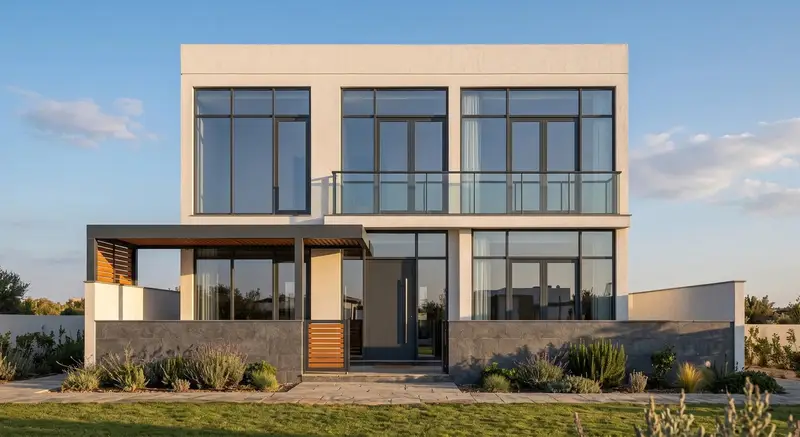
A 3D elevation is a realistic picture of one face of a building, usually the front, showing materials, colours, railings and light as they will look when built. It is a single view. You decide the look from it; your contractor still builds from the 2D drawings.
People mix it up with a 3D model, and the difference decides which tool you need. The model is the whole building, measured, that you can turn around or walk through; the elevation is one picture of one face. Want the whole measured building to furnish or reuse? Read our sister guide on turning a floor plan into a 3D model with AI. Want to see the house from the road? Stay here.
Can AI turn a 2D floor plan straight into a 3D elevation?
Not faithfully. A floor plan is a horizontal cut through the building, so it shows wall lengths, opening widths and room positions. Everything vertical is missing, and an elevation is mostly vertical information.
| What the elevation needs | On a typical floor plan? | Where to get it |
|---|---|---|
| Overall width of the front face, bay widths | Yes | Plan dimensions |
| Window and door widths and positions on the front wall | Yes | Plan |
| Plinth height above road or ground | Rarely | Section or architect. MBBL 2016 sets a minimum of 450 mm |
| Floor-to-floor height (FFL of each floor) | No | Section, or a level note like "FFL +3.10" |
| Sill and lintel heights of windows | No | Door and window schedule, section |
| Parapet or terrace railing height | No | Section or elevation |
| Balcony, chajja and canopy projections | Partly (dashed lines) | Plan plus section |
| Staircase headroom (mumty) on the terrace | Partly | Terrace plan plus section |
| Facade materials and colours | No | Your brief |
| Water tank, solar panels, AC units, nameplate | Sometimes | Your brief, MEP drawings |
10 rows in this table
For scale, the Model Building Bye-Laws 2016 published by the Ministry of Urban Development (clause 4.3.1.1) asks for habitable rooms at least 2.75 m from floor to the underside of the slab. Floor-to-floor is that plus slab and finish. Local bye-laws may differ, so take the number from your own drawings.
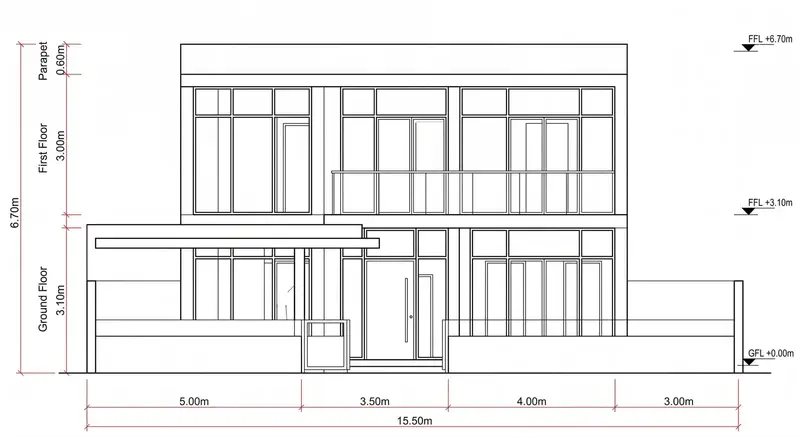
That is why a front elevation drawing beats a plan as an AI input. Bays, floor levels and parapet are fixed; nothing is left to guess.
Why does a chat AI give you a different house?
Because it has to make up every height and every face detail, and it makes them up to look good, not to match your plan. Paste a floor plan into a general chat image tool, type "make a 3D elevation", and it fills the gaps with the most typical modern house it can imagine.
Typical results: an extra window where your staircase is, a balcony on the wrong floor, or a third storey because "luxury villa" crept into the prompt. Ask again and you get yet another house. Fine for mood boards; a real problem when your family falls in love with a front your plan cannot produce.
The fix is not a cleverer prompt. It is a better input, plus a tool built to keep the lines you give it.
What should you give the AI instead of a floor plan?
Give it a picture of the front that already has the geometry fixed. In order of how faithful the result will be:
- A 2D front elevation drawing from your architect, as a clean PDF or PNG export. Best by far.
- A front view of a quick 3D massing with the right floor heights. Grey boxes with window holes are enough.
- A photo of the existing building, if renovating: straight on, from across the road.
- A neat hand sketch of the front, drawn over a printed plan so the widths are right.
Going the SketchUp route? Its guide to viewing a model shows the ready Front view in the Camera menu and recommends a standard view with Parallel Projection (orthographic) when exporting. That gives you a true elevation, not a perspective.
Only have a floor plan? Ask whoever drew it for the section and the levels. If nobody has drawn the front yet, that is design work, and it is worth paying a professional for. Our guide to 3D elevation design cost in India covers what a fair package includes.
How do you go from a 2D plan to a 3D elevation with AI?
Collect the missing heights, make a front view, then render it with a geometry-keeping tool. Here is the sequence we would follow:
- Gather the vertical numbers. Plinth level, each FFL, parapet height, sill and lintel heights. Write them on a printout of the plan.
- Get or make the front view. Export the architect's front elevation, or build a quick massing and take a parallel-projection Front view.
- Clean the image. One drawing per image. Crop off title blocks and text notes, which an AI may try to "build".
- Upload it to a renderer that keeps geometry. We built Velocity AOI's Exterior Rendering for this: it takes an elevation drawing, sketch, CAD or SketchUp view, massing or site photo and returns a photoreal view up to 4K in about 30 seconds, openings and levels where you drew them.
- Set the look. Environment, lighting, materials, camera and landscape have their own controls (30+ parameters), so one long prompt is not carrying everything.
- Try two or three finishes. Change materials only; keep camera and light fixed so the comparison is fair.
- Check it against the drawing (list below) before anyone else sees it.
- Make the other sides. A corner plot needs more than the front. The Elevation Engine produces matched front, left, right and rear views from the same design.
Three 2D plan to 3D elevation AI prompts for Indian houses
A useful prompt describes materials, light and setting, and states what must stay fixed. It never describes the shape; the drawing does that. Three we would start from:
Prompt 1: G+1 on an east-facing 30×40 plot in Nagpur
Photoreal front elevation of a G+1 house on a 30×40 east-facing plot in Nagpur. Ground floor exposed red brick, first floor smooth white plaster, MS railing painted charcoal on the balcony, grey Kota stone on the plinth. Morning sun from the front, clear sky, a neem tree on the left, a narrow paved lane. Keep every opening, floor level and the parapet exactly as drawn.
What it controls: "east-facing" with "morning sun from the front" gives believable light. One finish per floor stops the AI mixing them. The last line is the guard rail.
Prompt 2: Narrow G+2 in Kochi, monsoon look
Photoreal elevation of a G+2 townhouse on a narrow plot in Kochi during the monsoon. Laterite stone on the ground floor, off-white textured paint above, deep concrete chajjas over every window, dark grey metal louvres on the staircase window. Overcast sky, wet road with reflections, coconut palms behind. Do not add windows, balconies or floors.
What it controls: "monsoon", "overcast" and "wet road" change the mood without touching geometry. "Do not add" stops the commonest invention.
Prompt 3: Corner plot G+1 in Bengaluru at dusk
Photoreal corner view of a G+1 house on a corner plot in Bengaluru at dusk. Grey textured exterior paint, vertical teak-finish louvres on the first-floor bedroom, frameless glass railing on the terrace, warm interior lights on, soft garden lighting along the compound wall. Keep the drawn proportions and parapet height.
What it controls: "corner view" asks for two faces, so feed it a massing view, not a flat drawing. "Interior lights on" makes dusk read as a lived-in home.
Whatever you write, name real materials (Kota, laterite, Mangalore tile) rather than "luxury cladding", change one thing per try, and never let the prompt contradict the drawing.
How do you check an AI elevation against the drawing?
Hold the drawing next to the picture and count. If something does not match, the render is wrong, however good it looks. Our checklist:
- Windows and doors: same number on each floor, same positions, same widths relative to the wall.
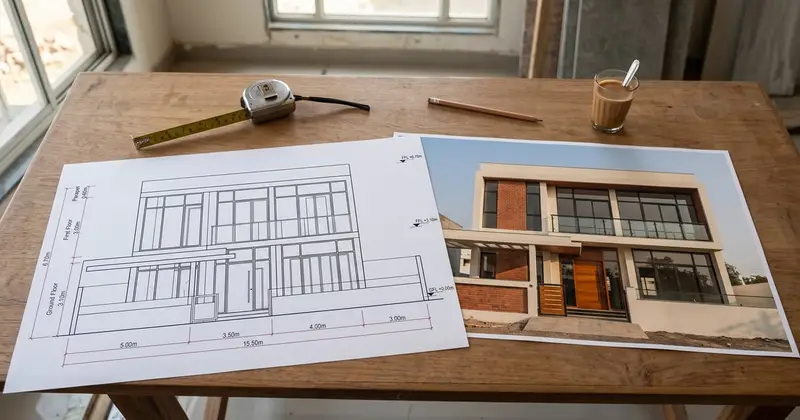
- Floor levels: the first-floor slab band sits where the FFL says (in the example drawing above, +3.10 m), and the terrace where the next mark says.
- Plinth: steps or a plinth band are visible. MBBL 2016 clause 4.2.1.1 asks for a plinth of at least 450 mm above the surrounding ground.
- Parapet and railings: clause 4.12 of the same bye-laws sets parapets and handrails on terraces, balconies and verandahs at 1.0 m to 1.2 m above finished floor, except where the terrace is not reached by a staircase. A low facade band on a drawing is fine for looks; if the terrace is used, ask your architect where the safe railing goes.
- Projections: chajjas, balconies and canopies project about as drawn.
- Roof clutter: mumty, water tank and solar frame are shown or knowingly hidden.
- Nothing added: no bonus floor, porch, pergola or column.
Is there a free 2D plan to 3D elevation AI?
Some general image tools let you try a few pictures without paying, and they are fine for mood. For a faithful elevation of your own plan, the real cost is not the tool. It is the time lost when the picture does not match the drawing and someone has to explain why the balcony cannot move.
To spend nothing, go manual: build a simple massing from the plan and the levels, take a front view, and use that as your reference. For speed and accuracy, use a renderer that keeps geometry and put your effort into the input.
What an AI elevation cannot do
An AI elevation is a design picture, not a construction document. It does not check structure, setbacks, height limits or fire rules, and it cannot tell you whether that cantilevered box over the gate needs a steel section. Nor does it measure: a render can look right and still be off everywhere.
Our view: decide the look with your family, then hand the chosen image to your architect as a brief. For choosing materials once the form is fixed, see how AI is changing facade design for houses.
FAQ
What is a 3D elevation?
A 3D elevation is a realistic image of one side of a building, usually the front, with materials, colours, railings and light shown as they will look when built. It is made from the 2D elevation drawing or a 3D model, and families use it to decide and approve the look before construction. The contractor still builds from the dimensioned 2D drawings.
Can I make a 3D elevation from a 2D floor plan alone?
Not faithfully. A floor plan shows widths and room positions but no floor heights, sill or lintel levels, parapet, projections or materials. An AI given only the plan has to invent all of these. Collect the levels from the section first, or start from a 2D front elevation drawing or a simple massing view, then render that.
What is the best input for a 2D plan to 3D elevation AI?
A clean 2D front elevation drawing is the best input, because floor levels, openings and the parapet are already fixed. A plain front view of a SketchUp massing with the right heights is the next best. Crop out title blocks and notes, keep one drawing per image, and use a renderer that preserves the geometry you upload.
How do I write a prompt for a 3D elevation?
Describe what the drawing cannot: materials for each floor, light, sky, season and surroundings. Name real materials such as exposed brick, Kota stone or laterite, and say where each goes. Finish with a line such as "keep every opening, floor level and the parapet exactly as drawn". Do not describe a different shape or number of floors from your drawing.
What is the difference between a 2D elevation and a 3D elevation?
A 2D elevation is a flat, scaled line drawing of one face of the building, with dimensions and levels, that the contractor builds from. A 3D elevation shows that same face realistically, with materials, depth and light, so you can judge how it will look. You need both: one to decide, one to build correctly.
See your front before you finalise it
Get the levels, get a clean front view, and you can compare three finishes on your own house in one evening instead of arguing over a guess. You can upload your elevation drawing or massing view on Velocity AOI and keep the drawing exactly as it is while you try the materials.
Sources

Written by
Velocity Team
Architecture and design team at Velocity AOI
We write plain guides for Indian home-owners and the architects they hire. Every number links to its source, and images made with AI are labelled.