


AI Interior Design From a Photo: 7 Steps for Indian Rooms
How to redesign a room from a phone photo with AI without losing your windows: how to shoot an Indian room, restyle vs edit tools, a prompt formula with real material words, six checks, and a brief your carpenter can price.

Written by Velocity Team
Architecture and design team at Velocity AOI
Published
Updated
Reading time
12 min
On this page11 sections · 12 min read
- Key takeaways
- What are the steps to redesign a room from a photo with AI?
- How should you take the photo so the AI keeps your room?
- Why do some AI tools move your windows?
- Which kind of AI tool do you need: restyle everything or change one thing?
- How do you write a prompt for AI room design?
- What does AI get wrong in a room redesign, and how do you check it?
- How do you turn the AI picture into a real room?
- Is it safe to upload a photo of your home to an AI tool?
- FAQ
- Start with one wall
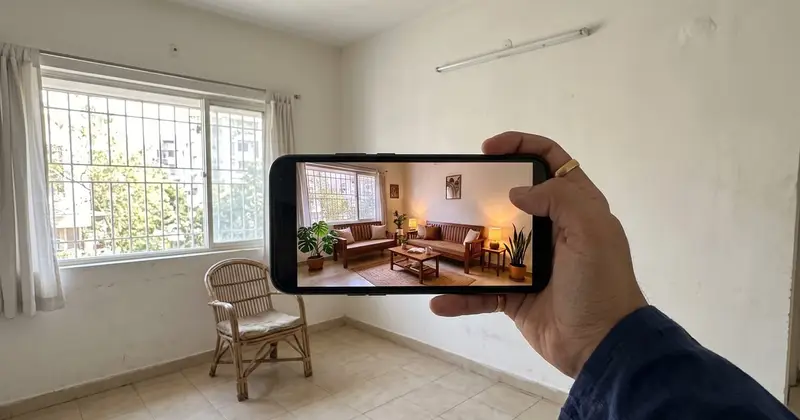
AI interior design from photo uploads works best when the tool treats your photo as a fixed shell: walls, windows, beams and floor level stay put, and only what you name changes. Shoot the room straight with the 1× lens, say what must stay, describe the change in material words, then check the picture against a tape measure before anyone cuts plywood.
Most guides stop at "upload and pick a style". Below: how to photograph an Indian room (grills, lofts, split ACs and all), which tool to use when, prompts that name real materials, a six-point check, and a brief your carpenter can price.
Key takeaways
- The photo decides the result. Use the 1× lens at chest height, phone level, one photo per wall.
- Restyle generators suit mood. For a room someone will build, use a tool that keeps the geometry and changes one thing at a time.
- Say what stays before you say what changes, and name the materials.
- Check windows, beams, scale, products, light and service points before you show anyone.
- A photo of your home is personal data. Crop and strip the location before you upload.
What are the steps to redesign a room from a photo with AI?
Seven, from the camera to the carpenter. The first four take an evening on your phone; the last three make the picture buildable.
- Photograph each wall straight, with the 1× lens, in steady light.
- Pick the kind of tool: a restyle generator for mood, an editor that keeps the room for decisions.
- Decide what stays and what changes, and write it down.
- Write the prompt in five parts: keep, change, material, light, avoid.
- Check the result with the six-point list below.
- Measure the room and mark sizes on the picture you chose.
- Turn it into a material list and a BOQ, and show the carpenter both.
How should you take the photo so the AI keeps your room?
Stand in a corner or the doorway at chest height, hold the phone horizontal and level, use the 1× lens, and shoot in even light with the clutter cleared. Take one photo per wall rather than one wide shot of the whole room.
The lens matters more than people expect. Apple's iPhone 17 tech specs list the main camera at 26 mm and the ultra wide at 13 mm with a 120° field of view. That 0.5× view fits a small bedroom into one frame but stretches whatever sits near the edges; Samsung's Galaxy S21 camera support page says minor distortion may occur in wide-angle photos. An AI tool cannot tell lens stretch from a long sofa, so it designs for a room that is not yours.
Here is the routine we would follow:
- Clear what moves: clothes, bags, the drying stand. Leave fixed things (RO purifier, geyser, switchboards) in the frame; the design must work around them.
- Fix the light. Daylight with curtains open, or every light on. A cool tube light beside a warm bulb hides the true wall and floor colours.
- Stand in a corner or the doorway, phone at chest height and horizontal.
- Keep it level. If your camera app has a grid or level, switch it on; door frames should look vertical.
- Stay on 1×. If the room won't fit, step back or take two overlapping photos.
- Get the edges in: floor, ceiling line, and the window wall in at least one shot.
- One photo per wall. Four for a bedroom; five or six for a 2BHK living-dining.
Indian rooms have details that generic guides skip. Keep them in the frame on purpose:
- Window grills, sharp and whole, or the tool may "finish" the window without one.
- Lofts, which show where the real ceiling is.
- Split AC units and drain pipes, which decide where a tall wardrobe cannot go.
- Beams and columns, common in older flats. Name them in the prompt too.
- The pooja niche, shot straight on as its own photo.
- Switchboards, because moving electrical points means chasing walls.
Why do some AI tools move your windows?
Because a restyle generator repaints the whole photo. It treats your picture as a loose starting point, and the more freedom it gets, the less of your actual room survives.
The open-source diffusers library explains this in its image-to-image guide. A setting called strength controls how far the result may drift: a higher value gives the model more "creativity" to depart from the original, and at 1.0 the initial image is "more or less ignored". Whether or not an app shows you that dial, the trade-off is there: a dramatic makeover and a faithful room pull in opposite directions.
Tools that keep the room add constraints. The same guide describes ControlNet, which conditions the result on an extra image such as an edge map, a depth map or a segmentation, so the output "preserves the information in it". General assistants are heading the same way: Google says the Gemini app's multi-turn editing can alter specific parts of an image while preserving the rest, and its example is an empty room where you paint the walls, then add a bookshelf.
A landing page won't tell you which kind a tool is. So test it: upload one photo, ask for one small change, and count the windows.
Which kind of AI tool do you need: restyle everything or change one thing?
Use a restyle generator when you want mood and direction, and an editor that holds the geometry when you are making decisions someone will build. Most homes need both, in that order.
| "Restyle everything" generator | "Keep the room, change one thing" editor | |
|---|---|---|
| What changes | The whole image: furniture, finishes, sometimes windows, doors and room size | Only the part you name; walls, windows and ceiling stay |
| Good for | "What style do we even like?", mood boards, the first family discussion | Choosing the sofa, floor, wall finish or lamp; client sign-off |
| Typical input | One photo and a style name | A photo plus a precise instruction, a library item or a product photo |
| Main risk | A beautiful room that is not your room | Small edits look right, but scale still needs checking |
| Enough on its own when | You are only browsing, or the room is being gutted anyway | You know the layout and are choosing items |
| Show it to a carpenter? | No | Yes, with measurements |
When is a mood generator enough? When the family can't agree between "warm wood" and "white and grey". Pick the direction, then put those images away. Never send them to a vendor; that room doesn't exist.
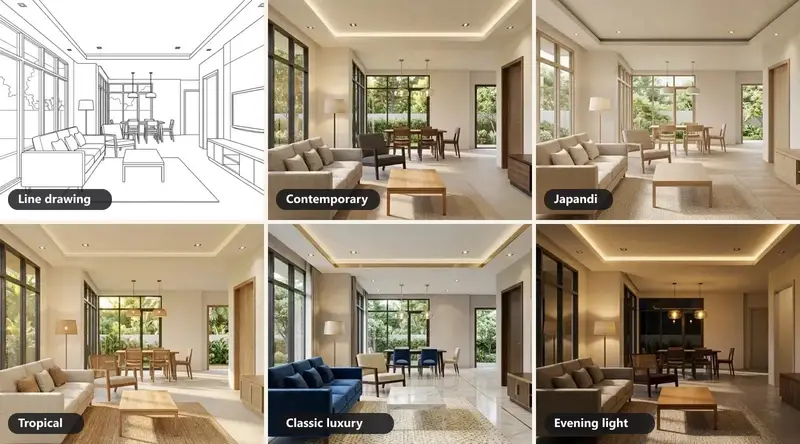
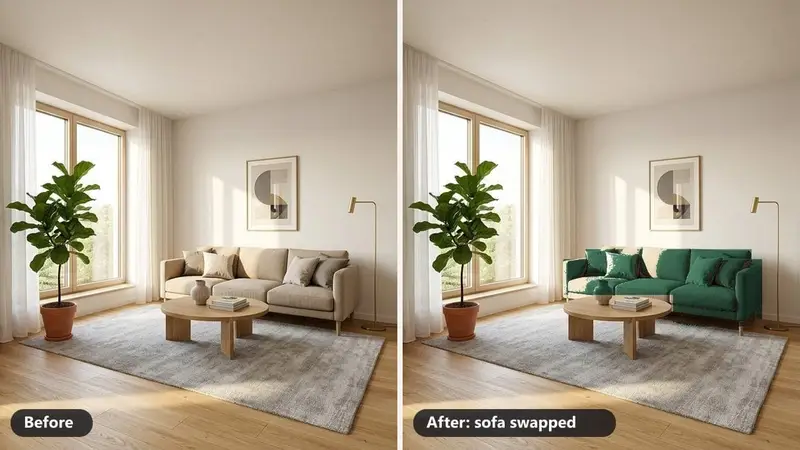
For the second kind, we built two tools. Interior Rendering takes a photo, sketch or model view of a room and lets you choose the style, floor, time of day and lights while the layout is kept. Edit & Swap changes one thing (the sofa, the floor, a wall finish, a lamp) by describing it, picking from a library or uploading a real product photo, and leaves the rest of the image as it was.
How do you write a prompt for AI room design?
Say what stays before you say what changes. A prompt that works has five parts: keep (walls, windows, grill, door, ceiling, beams), change (one or two items), material (real names and finishes), light (time of day and fittings) and avoid (what the tool must not add).
Material words give the tool something to hold on to; "modern luxury" gives it nothing. Useful ones for Indian homes: vitrified tiles, Kota stone, teak veneer, walnut laminate, PU finish, acrylic shutters, cane, jute, jaali, brass.
Five example prompts for real rooms:
- 2BHK living room, Thane: "Keep the walls, the sliding window with its grill, the main door and the ceiling exactly as they are. Replace the sofa with a three-seater in a teak frame with cane back panels. Keep the beige vitrified floor; add a jute rug. Warm evening light from two floor lamps. Do not add ceiling lights or windows."
- Kids' room: "Keep the window, the loft and the split AC. Paint the wall behind the bed pale sage and add a white laminate study table along the window wall. Daylight. Do not move the AC."
- Parallel kitchen, Pune: "Keep the window, sink, hob and chimney where they are. Change the shutters to matt PU in light grey with brass handles, and the counter to black granite. Do not add an island."
- Pooja corner: "Keep the wall and the niche size. Add a teak veneer mandir unit with a brass-finish jaali door and one drawer for diyas. Soft warm light from above. Leave space for our own idols; add none."
- Old-flat bedroom, Chennai: "Keep the exposed beam and the wooden window frame. Change the floor to matt Kota stone and the wardrobe shutters to walnut laminate. Morning light. Do not remove the beam."
One change per round. Ask for six things at once and you won't know which one broke the window.
What does AI get wrong in a room redesign, and how do you check it?
The usual errors are moved or missing windows, vanished beams, furniture that cannot fit, products nobody sells, and light no fitting could give. Run every image through these six checks before it reaches the family WhatsApp group or a client.
- Windows and doors. Same number, position and size, grill still there. Put before and after side by side and trace each frame.
- Structure. Beams, columns, lofts and ceiling height as they were. A room that suddenly looks taller has probably lost a beam.
- Scale. Measure your main door; it is the scale bar in your photo. If the new sofa is wider than its wall, or the bed leaves no walkway, the picture is lying.
- Real products. Could you buy that sofa, tile or lamp, in that size, from a seller you know? If not, find the nearest real one and use its photo next round.
- Light. Every glow needs a fitting. A cove needs a false ceiling deep enough for the profile; a sunbeam needs a window facing the right way.
- Services. Switchboards, the AC and its drain, plumbing points, the kitchen exhaust. Nothing new should block them.
How do you turn the AI picture into a real room?
Treat the picture as a brief, not a drawing: add measurements, a material list and an itemised BOQ, and give your carpenter all of it together.
- Measure every wall, window, door, beam depth and the ceiling height, with a 5 m tape or a laser meter.
- Mark it up. Write sizes on a printout of the picture: "sofa 7 ft", "wardrobe 6 ft wide × 7 ft high".
- List the materials: board, finish, shade, hardware, fittings. "Walnut laminate" is a start; a quote needs the shade name.
- Get a BOQ room by room and line by line, with brand and grade, so quotes compare fairly. Our guide to interior design cost per sq ft explains what each line covers.
- Brief the carpenter with the picture and the measured sketch side by side, and ask for shop drawings of wardrobes and kitchen first.
- Keep the "before" photo to compare against when the work is done.
Designers showing a client options from a site photo: show two or three directions, not ten, and lock materials before the BOQ goes out. Our roundup of AI tools for interior designers maps the other stages, from layout to the 360° walkthrough.
Is it safe to upload a photo of your home to an AI tool?
It can be, if you treat the photo as personal data and read the tool's terms first. India's Digital Personal Data Protection Act, 2023 defines personal data as "any data about an individual who is identifiable by or in relation to such data". A family picture on the wall, a courier label on the table or the flat number on the door can identify you.
Before you upload:
- Crop out faces, family photos, documents, bills and the flat number.
- Check the window view. A recognisable building outside can give your address away.
- Strip the location. Apple's guide to location metadata in Photos warns that people you share a photo with may be able to see where it was taken, and shows how to turn location off when sharing.
- Read the terms. Does the tool keep your photos, use them to improve its models, or show them in a public gallery? Can you delete them?
- For a client's home, ask the client first.
FAQ
Is AI interior design from photo uploads accurate enough to build from?
Not on its own. A good image shows the look, the materials and roughly where things go, but it carries no dimensions and cannot see behind walls. Use it as the brief: measure every wall, write sizes on the chosen picture, list materials by name and grade, and get an itemised BOQ. Your carpenter builds from the measurements and shop drawings, with the picture beside them.
Are free AI room design tools good enough?
They can be good enough for mood. If a tool offers a no-cost tier, check four things before relying on it: the image size you get, whether there is a watermark, how many images you can make, and whether the terms let the company keep or train on your photo. For decisions someone will build, choose a tool that keeps your room's geometry.
Can a general AI assistant like Gemini redesign my room?
It can edit room photos. Google said in August 2025 that the Gemini app supports multi-turn edits that change specific parts of an image while preserving the rest, and that every image it creates or edits carries a visible watermark. That is useful for quick ideas, but check the result with the same six points you would use for any tool.
Can I use AI to plan a makeover in a rented flat?
Yes. Tell the tool to keep everything fixed (floor, walls, built-in wardrobes, lights) and change only what you can carry out when you move: curtains, a rug, a cane chair, lamps, plants. Shoot each wall with the 1× lens, then check every new piece against your own tape measure before you buy it.
Start with one wall
Take one straight photo of the wall you look at most, change one thing, and run the six checks. If it passes, measure and write the sizes on it. When you want to try it on your own room, Edit & Swap and Interior Rendering are both in the AI Suite on Velocity AOI.
Sources

Written by
Velocity Team
Architecture and design team at Velocity AOI
We write plain guides for Indian home-owners and the architects they hire. Every number links to its source, and images made with AI are labelled.